
I built it so I can track my own metals portfolio.
The Bullion API now has portfolio pages, a portfolio REST API and read-only MCP tools, and all three are live. There are pages to look at the portfolio, a REST API an agent can use to build it, and MCP tools so an assistant can explain how it is doing.
Every figure in this article is demo data. Everything was captured on 25 October 2026 from a local copy of the app. The prices are made up. One gold purchase came from the app's test seed, and the other purchases and the one sale were recorded through the REST API. The keys are throwaway local keys. Nothing here comes from production, and none of it is a real return.
Why a portfolio sits in an API
The portfolio is one record that three things can use. You can look at it on a page. An agent can add to it over REST. An assistant can read it through the MCP and answer questions about it.
Each holding is valued at the latest stored price, and the page shows the date of that price. It is not a live quote. The API marks a valuation as current for six hours after the price was stored, stale after that, and unavailable when there is no price.
The pages
The portfolio lives in the signed-in dashboard at /dashboard/portfolio. It has four tabs: Overview, Transactions, Gains and Settings.
Overview
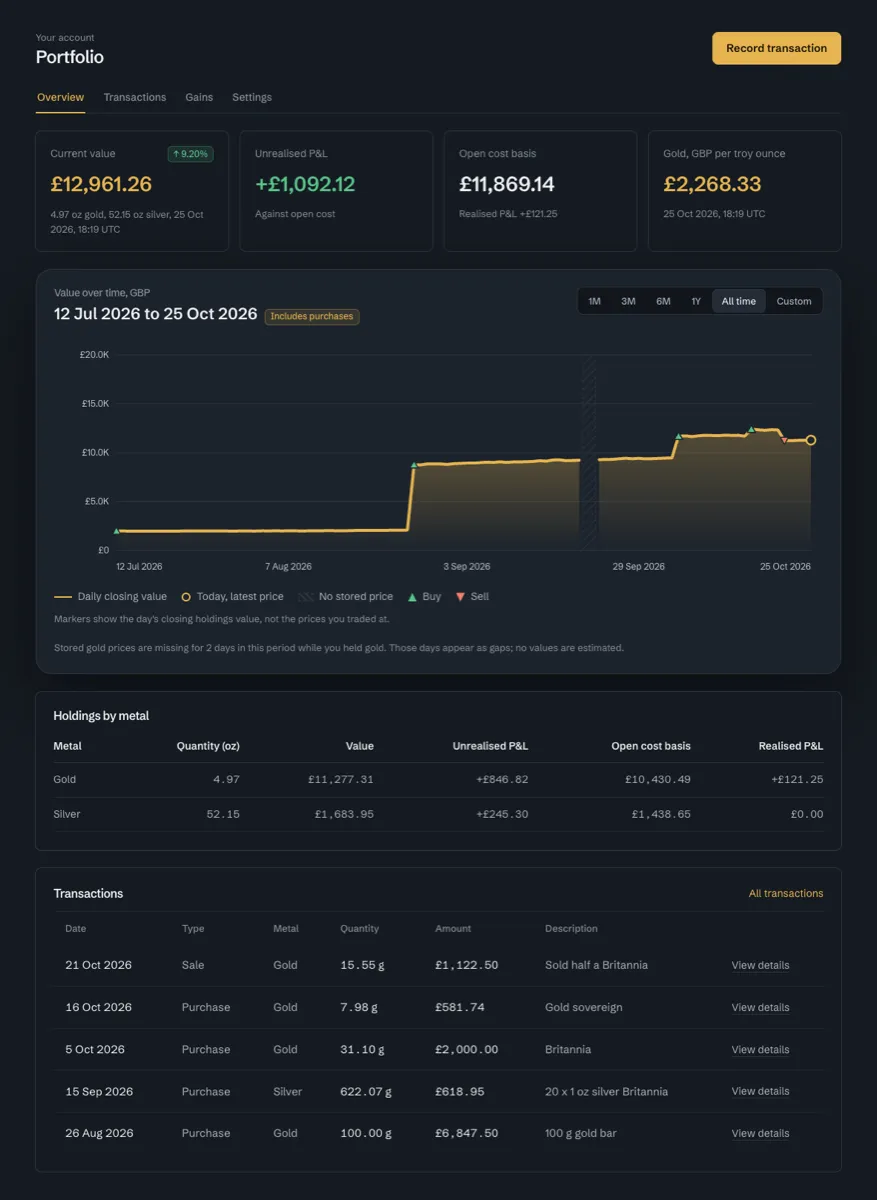
Overview starts with four number cards. Current value has a percentage pill. Unrealised P&L is measured against open cost. Open cost basis carries the realised P&L underneath. The fourth card is the latest stored gold price in the reporting currency, with its timestamp.
Under the cards there is a value-over-time chart, a "Holdings by metal" table and the five latest transactions. The cards and the table cover gold and silver.
The value chart
The chart has range buttons for 1M, 3M, 6M, 1Y, All time and Custom. A triangle pointing up marks a buy and one pointing down marks a sell. A hollow ring marks today at the latest price.
The chart covers gold only. Silver is in the cards and the table but not in the line. That is why the chart ends at £11,277, the gold value, while the Current value card says £12,961, which includes silver.
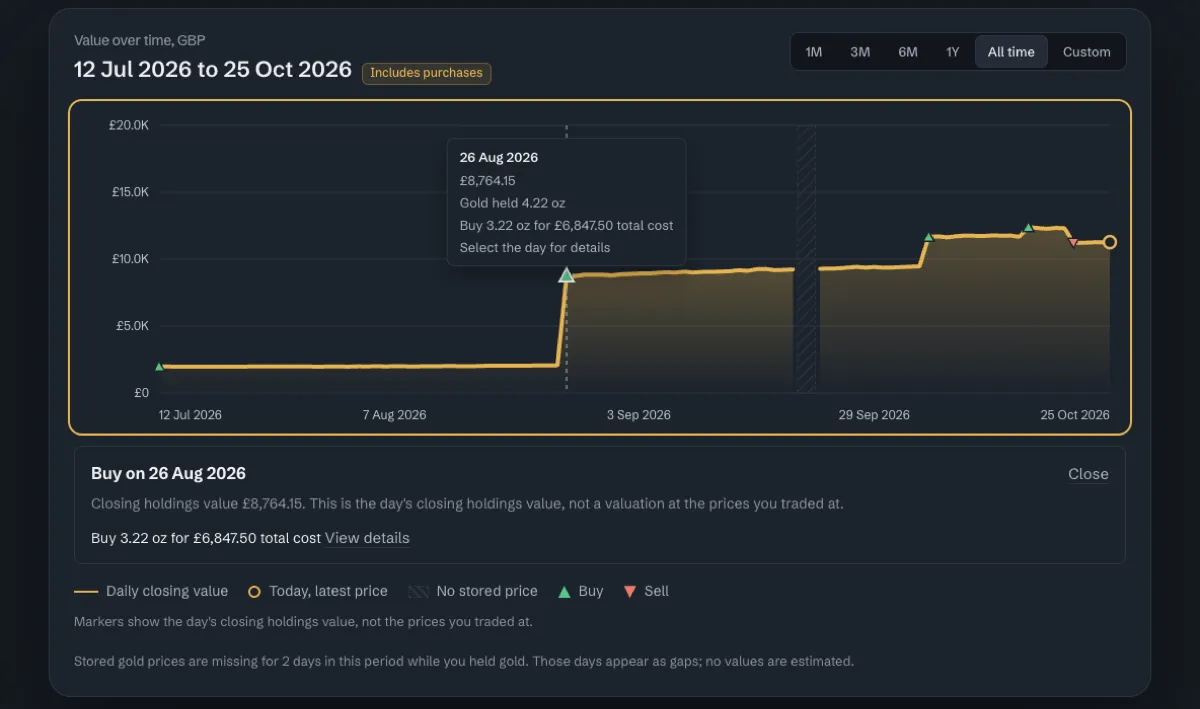
The markers show the day's closing holdings value. They do not show the price you traded at. The chart says so under the legend.
Two weekdays in the demo data have no stored price. The chart draws a hatched band there and says so in words: "Stored gold prices are missing for 2 days in this period while you held gold. Those days appear as gaps; no values are estimated."
The chart works from the keyboard. Focus it and the left and right arrows move between days. N and P jump to the next or previous buy or sell day. Selecting a day opens a panel with the day's closing value, the transactions that day and a link to their details.
Transactions and details
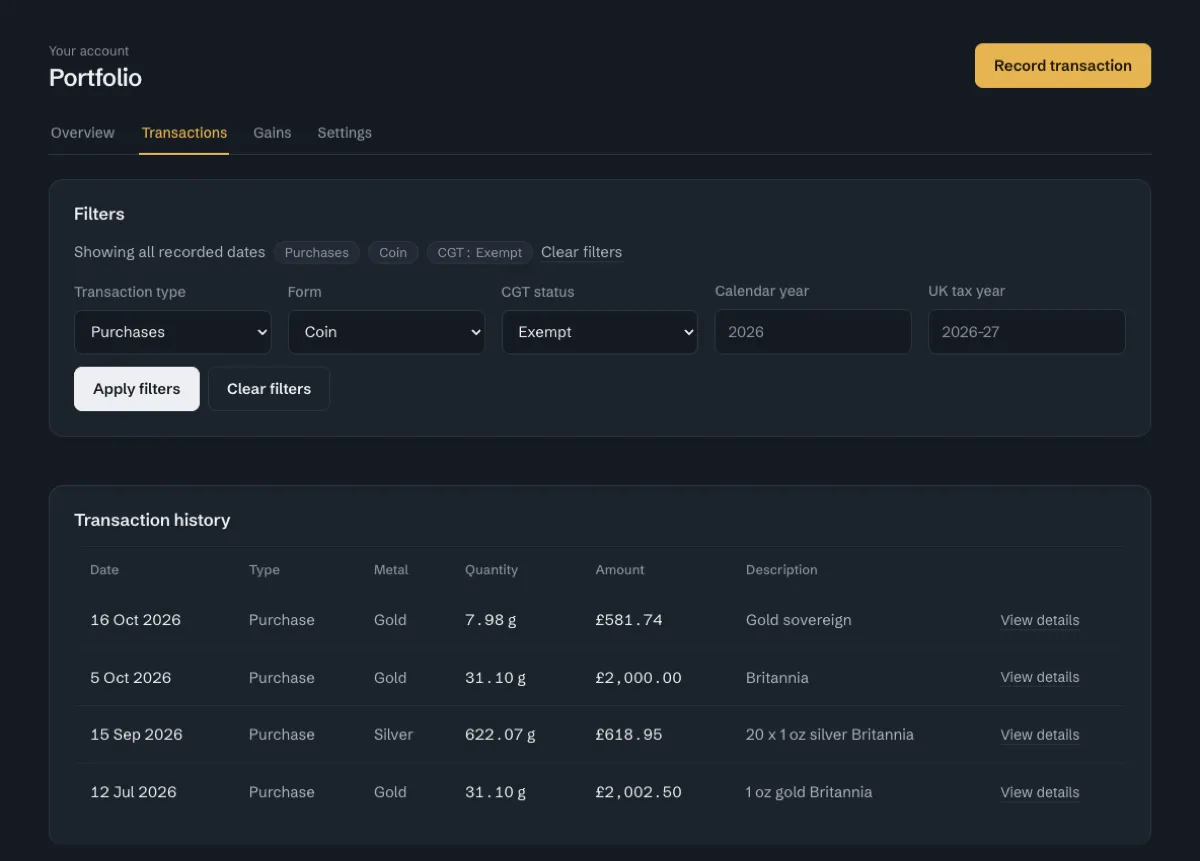
The Transactions tab is a table with filters for transaction type, form, CGT status, calendar year and UK tax year. The filters live in the query string, so a filtered view is a link you can share or bookmark. ?type=purchase&form=coin&cgt_status=exempt shows coin purchases declared CGT exempt.
Each row opens a detail page with the exact recorded values. They are the quantity and unit you entered, the grams, the unit price, gross and total cost, form, CGT status and lot state. That page has Edit purchase and Delete transaction buttons. The Overview and Transactions tabs also have a Record transaction button, for typing a purchase in by hand.
Gains and settings
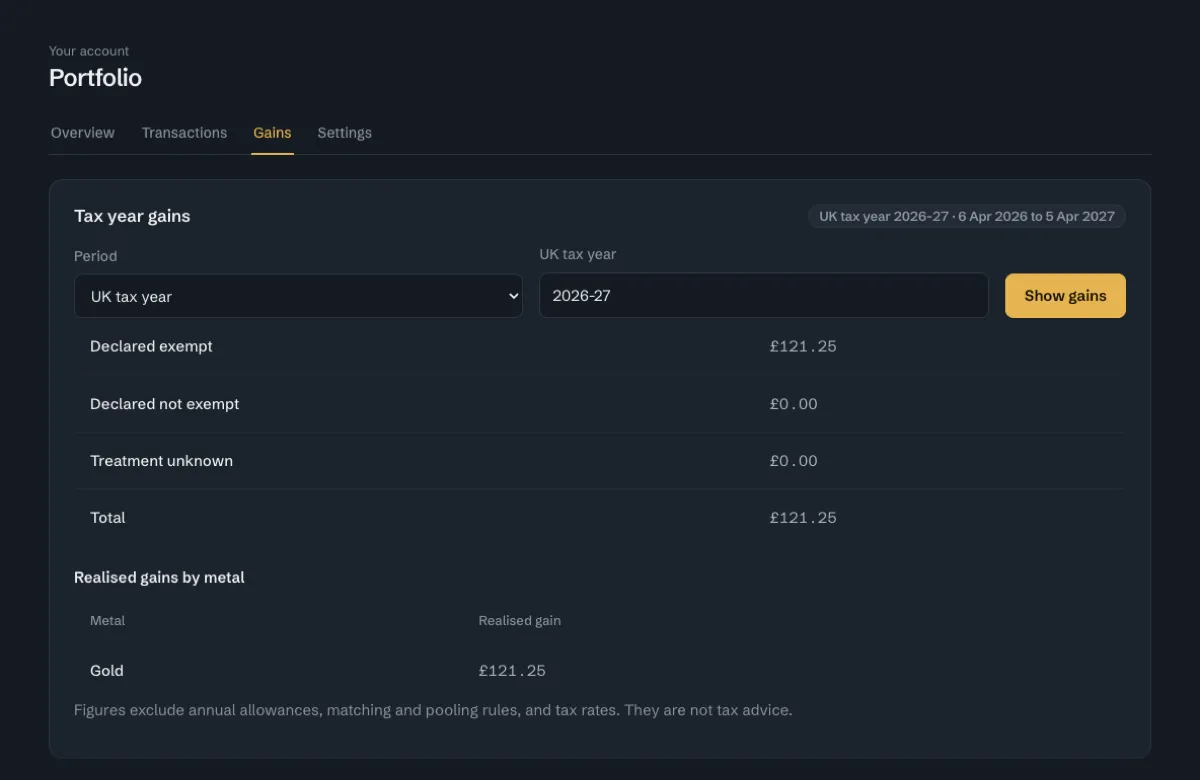
The Gains tab shows realised gains for one period at a time. The period is a calendar year or a UK tax year, such as 2026-27, which runs from 6 April 2026 to 5 April 2027. The total is split into "Declared exempt", "Declared not exempt" and "Treatment unknown", with a second table of gains by metal. The page says the figures exclude annual allowances, matching and pooling rules and tax rates, and that they are not tax advice.
Settings has one control, the reporting currency. You can change it only before the first transaction is recorded. After that the select and the Save button are disabled, with a line explaining why. A new portfolio shows zeros on the cards and a "Track what your metal is worth" panel with a Record a purchase button.
Giving an agent access
Before an agent can touch the portfolio it needs a key with permission. Each API key has a Portfolio access setting. It defaults to None. The owner can set it to Read or to Read and write, one key at a time.
A new key cannot see your holdings until you decide it should. A key that only needs to report can be Read, and the agent that records purchases gets Read and write. The page also lets you revoke a key.
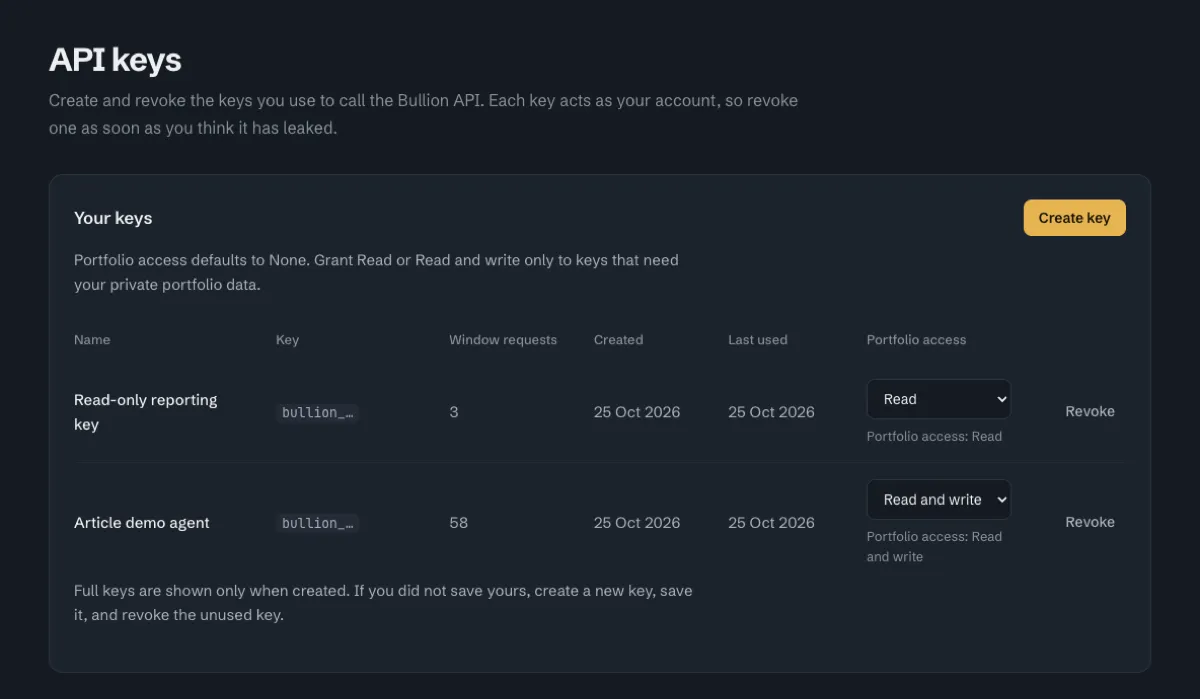
Building the portfolio over REST
The portfolio endpoints sit under /v1 and take the key in an X-API-Key header.
| Endpoint | What it does | Needs |
|---|---|---|
GET /v1/portfolio | Settings and a valuation summary, per metal and in total | Read |
POST /v1/portfolio | Create or update the settings (reporting currency) | Read and write |
GET /v1/portfolio/transactions | Transactions, newest first, with filters and a cursor | Read |
POST /v1/portfolio/transactions | Record a purchase, or a sale with a header | Read and write |
GET /v1/portfolio/transactions/{id} | One transaction | Read |
GET /v1/portfolio/lots | Open purchase lots with remaining grams and cost | Read |
GET /v1/portfolio/gains | Realised gains for one calendar year or UK tax year | Read |
Edit and delete are in the OpenAPI spec as PATCH and DELETE on a transaction. The captures here do not cover them.
Reading the portfolio does not use the monthly market-data quota.
Set up
The walkthrough below uses two variables. BULLION_API_BASE is the API address from the Bullion API docs. BULLION_API_KEY is a key with Read and write portfolio access. Use a throwaway portfolio, because these calls write to it. The commands and responses below are the ones captured on the demo data, with the responses trimmed.
export BULLION_API_BASE="<the API address from the docs>"
export BULLION_API_KEY="<a key with Read and write portfolio access>"
Record a purchase
A write needs an Idempotency-Key header. This purchase is one troy ounce of gold coin, bought on 12 July 2026. Money and quantities are decimal strings, never JSON numbers.
BODY='{"metal":"gold","transaction_date":"2026-07-12","quantity":"1","weight_unit":"troy_oz","unit_price":"1995.00","delivery_cost":"7.50","fees":"0","form":"coin","cgt_status":"exempt","description":"1 oz gold Britannia"}'

curl -sS -X POST "$BULLION_API_BASE/v1/portfolio/transactions" \
  -H "X-API-Key: $BULLION_API_KEY" \
  -H 'Content-Type: application/json' \
  -H 'Idempotency-Key: demo-buy-gold-coin' \
-d "$BODY"{
"status": "success",
"transaction": {
"metal": "gold",
"id": "90e08821-af39-46a9-a21d-29a3bdd628e1",
"transaction_date": "2026-07-12",
"entered_quantity": "1.00000000",
"quantity_grams": "31.103476800000000",
"weight_unit": "troy_oz",
"unit_price": "1995.00000000",
"gross_cost": "1995.00000000",
"delivery_cost": "7.50000000",
"total_cost": "2002.50000000",
"form": "coin",
"cgt_status": "exempt"
}
}The weight can be sent in grams, kilograms or troy ounces (gram, kilogram, troy_oz, or g, kg, toz). The API stores it in grams to 15 decimal places and returns money to 8 decimal places. The response keeps your own number as entered_quantity and puts quantity_grams beside it.
Send it again
An agent that loses the connection will retry. Send the same request with the same key and the original transaction comes back, with the same id and no second row.
curl -sS -X POST "$BULLION_API_BASE/v1/portfolio/transactions" \
  -H "X-API-Key: $BULLION_API_KEY" \
  -H 'Content-Type: application/json' \
  -H 'Idempotency-Key: demo-buy-gold-coin' \
  -d "$BODY"
The response is the same as above, with id 90e08821-af39-46a9-a21d-29a3bdd628e1.
Now reuse the key with a changed request, here a unit price of 2100.00. This is a different purchase wearing the same key, so the API refuses it.
curl -sS -X POST "$BULLION_API_BASE/v1/portfolio/transactions" \
  -H "X-API-Key: $BULLION_API_KEY" \
  -H 'Content-Type: application/json' \
  -H 'Idempotency-Key: demo-buy-gold-coin' \
-d "${BODY/1995.00/2100.00}"{
"status": "error",
"error": {
"code": "idempotency_conflict",
"message": "The Idempotency-Key was already used with another request."
}
}That is HTTP 409. Leave the header off and the API answers 400 with missing_idempotency_key and the message "An Idempotency-Key header is required".
Use the wrong key
A key with Read access can read the portfolio and cannot write to it. This is the same purchase sent with a read-only key in BULLION_READ_ONLY_KEY:
curl -sS -X POST "$BULLION_API_BASE/v1/portfolio/transactions" \
  -H "X-API-Key: $BULLION_READ_ONLY_KEY" \
  -H 'Content-Type: application/json' \
  -H 'Idempotency-Key: demo-read-only-attempt' \
-d "$BODY"{
"status": "error",
"error": {
"code": "insufficient_scope",
"message": "API key lacks the required portfolio scope"
}
}That is HTTP 403.
Sell some of it
A sale is the same endpoint with an X-Portfolio-Transaction-Type: sale header. By default a sale uses FIFO. It takes from the oldest open lots that match on metal, form and CGT treatment. This sale is half an ounce of gold coin, declared exempt.
curl -sS -X POST "$BULLION_API_BASE/v1/portfolio/transactions" \
  -H "X-API-Key: $BULLION_API_KEY" \
  -H 'Content-Type: application/json' \
  -H 'X-Portfolio-Transaction-Type: sale' \
  -H 'Idempotency-Key: demo-sell-gold-coin' \
-d '{"metal":"gold","transaction_date":"2026-10-21","quantity":"0.5","weight_unit":"troy_oz","unit_price":"2255.00","delivery_cost":"0","fees":"5.00","form":"coin","cgt_status":"exempt","description":"Sold half a Britannia"}'{
"status": "success",
"transaction": {
"type": "sale",
"metal": "gold",
"quantity_grams": "15.551738400000000",
"gross_proceeds": "1127.50000000",
"net_proceeds": "1122.50000000",
"disposed_cost": "1001.25000000",
"realised_pnl": "121.25000000",
"allocation_method": "fifo",
"allocations": [
{
"purchase_transaction_id": "90e08821-af39-46a9-a21d-29a3bdd628e1",
"lot_id": "025e14e9-ba24-4b58-961f-27bdef7f7153",
"quantity_grams": "15.551738400000000",
"cost_basis": "1001.25000000"
}
]
}
}The sale came out of the 12 July coin lot. The lot cost 2002.50 with delivery, so half of it is 1001.25. The proceeds after the 5.00 fee are 1122.50, which leaves a realised 121.25. The allocations list shows which lot each gram came from. If you want to choose the lots yourself, the spec lets you send allocations with a lot_id and quantity_grams taken from /v1/portfolio/lots. That option is not in the captures.
Read it back
GET /v1/portfolio gives the summary for each metal and for the whole portfolio. After the demo writes, the gold cost basis was 10430.49 and the silver cost basis was 1438.65, so the portfolio total was 11869.14. The total valuation covers every metal, so its spot_price is null. The per-metal entries carry the prices.
curl -sS "$BULLION_API_BASE/v1/portfolio" -H "X-API-Key: $BULLION_API_KEY"{
"status": "success",
"summary": {
"cost_basis": "11869.14200000",
"realised_pnl": "121.25000000",
"metals": [
{
"metal": "gold",
"quantity_grams": "154.635215200000000",
"cost_basis": "10430.49200000",
"valuation": {
"status": "current",
"spot_price": "2268.33000000",
"current_value": "11277.31475005",
"price_timestamp": "2026-10-25T18:19:00.690Z"
}
}
],
"valuation": {
"status": "current",
"spot_price": null,
"current_value": "12961.26235675",
"unrealised_pnl": "1092.12035675"
}
}
}That response is trimmed to the gold entry. The silver entry has the same shape.
The transaction list returns newest first. limit defaults to 50 and goes up to 100. Pass the next_cursor from one page as cursor on the next. The cursor is opaque, and next_cursor is null on the last page. The filters match the ones on the page: type, form, cgt_status, calendar_year and uk_tax_year.
curl -sS "$BULLION_API_BASE/v1/portfolio/transactions?type=purchase&form=coin&cgt_status=exempt" \
  -H "X-API-Key: $BULLION_API_KEY"
That returned the same four coin purchases as the filtered page above. GET /v1/portfolio/lots lists what is still open. In the demo data the 12 July coin lot shows 15.5517384 grams remaining with a cost basis of 1001.25, which is what is left after the sale.
Gains need exactly one period.
curl -sS "$BULLION_API_BASE/v1/portfolio/gains?uk_tax_year=2026-27" \
-H "X-API-Key: $BULLION_API_KEY"{
"status": "success",
"period": {
"kind": "uk_tax_year",
"label": "2026-27",
"start": "2026-04-06",
"end": "2027-04-05"
},
"metals": [{ "metal": "gold", "total": "121.25000000" }],
"buckets": {
"exempt": "121.25000000",
"not_exempt": "0.00000000",
"unknown": "0.00000000"
},
"total": "121.25000000"
}Ask for gains with no period and you get a 400 with missing_period and the message "Use either calendar_year or uk_tax_year."
Asking questions through the MCP
The MCP server at https://api.bullionapi.dev/mcp also reaches the portfolio. This part has no screenshot and no transcript. I decided to explain it in words. What follows is how the connector is built to work, taken from the code and the docs, not from a recorded session.
You add the server to your assistant, sign in to your Bullion API account and approve read access. Sign-in uses OAuth 2.1 with PKCE. There is no API-key fallback and no shared secret. The scopes are market:read, macro:read and portfolio:read. A separate optional "Stay connected" permission lets a client renew its five-minute access tokens without asking you to sign in again. It gives no access to data. The MCP setup page has the steps.
The tools
The portfolio tools need the portfolio:read scope.
| Tool | What it returns |
|---|---|
get_portfolio | The summary for the connected account: holdings in grams, cost basis, realised and unrealised profit and loss, valued at the latest cached price |
get_portfolio_lots | Open lots, which are purchases not yet sold, with remaining quantity and cost |
get_portfolio_gains | Realised gains and losses for one calendar year or one UK tax year, grouped by capital-gains status |
list_portfolio_transactions | Purchases and sales, paged with limit and cursor, filtered by type, form, capital-gains status or year |
get_portfolio_transaction | One transaction by id, with its lots and allocations |
No tool takes an account id. A client can only read the account that signed in.
There is also a ready-made prompt called Portfolio review, described as "My holdings, current value, gains and recent transactions". It tells the assistant to call get_portfolio and get_portfolio_lots, then get_portfolio_gains for the current year, then list_portfolio_transactions for recent activity.
You do not need the prompt. You can ask in your own words. Review my portfolio. What are my open lots and what did each cost? What did I realise last UK tax year? Show my most recent purchases.
The same connection reaches prices, price history, metal change, central-bank gold and reserves, inflation, policy rates, bond yields, money supply and government debt. That lets an assistant put a portfolio next to the market. For example, how is my gold doing against the last three months of the gold price?
get_portfolio and get_metal_price_history can also offer an inline view in hosts that support MCP Apps. It is a sortable portfolio table, with a checkbox to show exact decimal values, and a price chart. Hosts without that support get the text and the structured result. I cannot say which apps show the view.
Why it only reads
The MCP cannot create, edit or delete a transaction. It cannot place a trade, move money or change a subscription. It is read-only.
That splits the job in two. An agent writes through the REST API, with a key you control and can revoke, an Idempotency-Key on every request and Read and write access you granted on purpose. The assistant that explains the portfolio reads it through the MCP and has no way to change it.
Money and quantities stay exact decimal strings in the structured result, and summaries show two decimals. Values use the latest cached price, with an observation date, so say "as at" when you quote one. It is information, not financial advice.
The MCP allows 60 requests a minute for each client and account. Your plan and credit limits apply as well. Data calls use credits. Signing in and listing the tools are free.
Trying it
The Bullion API has the signed-in portfolio pages, the API docs and the MCP setup page. Create a key, leave its portfolio access on None until an agent needs it, and start with a throwaway portfolio.